Destination guides
Egypt Travel eSIM Guide: Mobile Data Tips for Pyramids & Beyond
Discover how to stay connected in Egypt with a travel eSIM. Explore local networks, step-by-step installation guides, and tips for seamless connectivity from Cairo to Luxor.
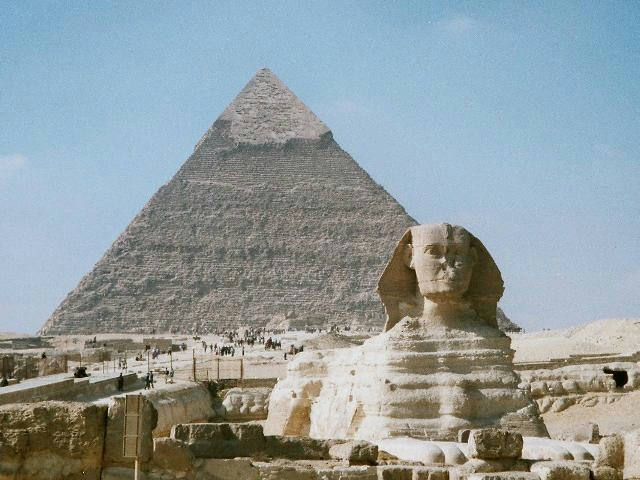
Getting around Egypt—from downtown Cairo and the Pyramids of Giza to a quiet Nile cruise between Luxor and Aswan—is much easier with a reliable mobile data connection. Whether you're booking an Uber, translating hieroglyphs, or uploading photos from the temples, having internet access on the go is essential for a smooth and stress-free journey.
Traditionally, picking up a physical SIM card meant waiting in long lines at Cairo International Airport (CAI) and filling out complex paperwork. Using a digital SIM, or eSIM, skips the hassle entirely, allowing you to land with an active data connection already configured on your device.
At eSIM Travel, we help travelers bypass physical stores with instant digital setup. This guide covers how to set up, manage, and make the most of your mobile data plan while visiting Egypt, ensuring you stay online wherever your itinerary takes you.
The short answer: An Egypt travel eSIM is the fastest way to get online as soon as you land, without needing to swap physical cards or visit local carrier shops. Buy a data plan beforehand, install the digital profile before you fly, and connect to top local networks the moment you touch down in Cairo.
Egypt eSIM at a glance
| Decision | Current answer | What to check again |
|---|---|---|
| Connectivity Type | Digital eSIM profile (no physical SIM swap required) | Ensure your phone is carrier-unlocked before purchase |
| Primary Local Partners | Vodafone Egypt, Orange, Etisalat by e&, WE | Check coverage maps for remote desert excursions |
| Installation Window | Install over Wi-Fi prior to departure | Verify you have the correct QR code or manual activation string |
Egypt's Mobile Network Landscape
Egypt's telecom industry is strictly regulated by the National Telecommunications Regulatory Authority (NTRA), ensuring high standards of service across major population centers. There are four main mobile networks operating nationwide: Vodafone Egypt, Orange, Etisalat by e&, and WE (Telecom Egypt). Each of these carriers offers solid coverage across major cities, Red Sea resort towns like Hurghada and Sharm El-Sheikh, and archaeological hubs along the Nile Valley.
When you buy an Egypt eSIM through eSIM Travel, your digital profile automatically connects to one or more of these high-performance local networks. This means you get a steady signal whether you're navigating the bustling alleyways of the Khan el-Khalili bazaar, taking a sunset felucca ride on the Nile, or checking historical facts outside the temples of Karnak. Understanding how these networks operate helps you choose the right data package for your specific travel needs.
Furthermore, urban centers benefit from robust 4G LTE coverage, with early rollouts of 5G infrastructure expanding rapidly in downtown Cairo and new administrative districts. While rural stretches between governorates may drop to 3G speeds temporarily, your overall connectivity remains dependable for everyday applications like navigation, messaging, and web browsing.
Why Use an eSIM Instead of a Physical SIM?
Going digital has clear perks over buying a plastic card at a crowded airport kiosk. First, you skip the notoriously long lines at Cairo International Airport, where exhausted travelers frequently wait up to an hour just to reach a customer service counter after a long-haul flight.
Second, your home physical SIM card stays safely tucked inside your phone, meaning you can still receive important two-factor authentication texts from your bank or airline without paying exorbitant traditional roaming fees. This dual-access setup is invaluable for maintaining account security while abroad.
Digital data profiles are also inherently eco-friendly, cannot be lost or damaged like physical nano-SIMs, and are managed directly through your phone's native operating system settings. If you happen to burn through your data allowance while exploring the Valley of the Kings, you can easily purchase a top-up package over hotel Wi-Fi within minutes.
Checking Your Device Compatibility
Before purchasing a data plan, it is critical to confirm that your smartphone is both carrier-unlocked and fully compatible with eSIM technology. The vast majority of recent Apple iPhone models, Samsung Galaxy flagships, and Google Pixel devices support digital SIM profiles seamlessly.
To check your device's readiness, you can dial *#06# to pull up your unique IMEI number and check your settings menu for an embedded EID number, which confirms eSIM hardware presence. Additionally, contact your home mobile carrier to verify that your device has no active financial or network locks restricting foreign carrier activation.
If your device is locked, foreign travel profiles will be rejected by the operating system, rendering them unusable until the restriction is lifted by your home provider. Taking five minutes to verify these technical details guarantees a frictionless activation experience upon arrival.
Mobile data for an international trip — setup guidance with example plan table
Setting up your mobile data for an international trip to Egypt is a straightforward process if you follow a structured checklist. Preparation before departure ensures you are never stranded offline upon arrival.
| Plan Type | Data Allowance | Validity Period | Best Suited For |
|---|---|---|---|
| Short Explorer | 3 GB | 7 Days | Weekend getaways and short Cairo city breaks |
| Standard Tourist | 5 GB | 15 Days | Standard week-long tours including Luxor and Aswan |
| Extended Voyager | 10 GB | 30 Days | Comprehensive multi-region travel and remote exploration |
Follow these sequential steps to get your connection up and running:
- Choose Your Plan: Pick a regional or Egypt-specific data package on eSIM Travel and complete your secure checkout.
- Get Your QR Code: Open the instant confirmation email containing your personal QR code and installation instructions.
- Install the Profile: Navigate to your phone's cellular settings, select 'Add eSIM' or 'Add Cellular Plan', and scan the QR code using your camera.
- Set Your Preferences: Label the newly installed profile clearly (e.g., "Egypt Travel") and designate it as your primary data source, keeping your home SIM active strictly for calls and SMS.
- Turn It On Upon Arrival: Enable data roaming exclusively for your Egypt travel profile the moment your flight touches down, allowing your device to latch onto a local partner network.
Managing Data at Historical Sites
While Egypt's major metropolitan areas and tourist hubs offer fast 4G LTE and growing 5G coverage, remote archaeological destinations like Abu Simbel, Mount Sinai, or deep desert excursions can experience intermittent signal drops or slower speeds due to distance from cellular towers.
To ensure your data allotment lasts throughout your entire itinerary, adopt smart data management habits. Download offline Google Maps for Cairo, Giza, and Luxor while connected to high-speed hotel Wi-Fi before heading out on day trips.
Similarly, save translation dictionaries, travel guides, and boarding passes offline. Turn off background app refreshes, cloud photo backups, and auto-play video settings on social media applications until you return to a secure Wi-Fi network at your accommodation.
Traveling to Multiple Countries?
If your Egyptian adventure is merely one stop on a broader journey through the Middle East, North Africa, or the Mediterranean basin, a multi-country regional connectivity plan is usually the most practical choice. Instead of purchasing a separate standalone data package at every international border, a regional eSIM switches network coverage automatically as you cross frontiers.
This seamless transition keeps you connected continuously without the administrative friction of buying new physical cards, registering passports repeatedly, or adjusting complex network settings at every airport. It represents the ultimate convenience for modern globetrotters tackling complex international itineraries.
Ten Egypt visitor questions
How do I install and activate an eSIM in Egypt?
Scan the QR code provided in your confirmation email into your phone's cellular settings while connected to a stable Wi-Fi network. The profile will install immediately and will activate automatically once you land in Egypt and turn on data roaming for that specific profile.
Which local Egyptian mobile operators support eSIM?
Vodafone Egypt, Orange, Etisalat by e&, and WE all support eSIM infrastructure locally, though purchasing digital profiles directly from physical carrier shops usually requires presenting your passport and completing mandatory government registration paperwork.
Do I need my passport to register a tourist eSIM or local SIM in Egypt?
Local Egyptian carrier shops legally require physical passport registration for all traditional tourist SIM cards. Pre-purchasing an international travel eSIM online through platforms like eSIM Travel helps you bypass this tedious paperwork entirely.
What is the best eSIM provider for data coverage around the Giza Pyramids and Luxor?
Providers that partner directly with top-tier local networks like Vodafone Egypt or Orange generally offer the most robust and reliable coverage across Giza, Luxor, Aswan, and major tourist corridors.
Can I use WhatsApp and VoIP calls over an Egyptian eSIM?
Yes, modern VoIP applications like WhatsApp, FaceTime, Telegram, Signal, and Zoom function normally over your mobile data connection without unexpected carrier restrictions or blocks.
Will my home SIM card still work for emergency calls?
Yes, modern dual-SIM smartphones let you keep your primary physical SIM card active for incoming emergency calls and text messages while routing all mobile data usage through your travel eSIM.
How long does it take for an Egypt eSIM to connect after landing?
Your phone will typically establish a secure connection to a local partner network within one to three minutes after you disable Airplane Mode and toggle on data roaming for the travel profile.
Can I share my Egypt mobile data with other devices via hotspot?
Yes, personal hotspot, tethering, and personal Wi-Fi sharing are fully supported on standard travel data plans, allowing you to connect laptops or travel companions easily.
What happens if I run out of data during my trip?
If you exhaust your allocated data bundle, you can instantly purchase a top-up package or a brand-new profile directly through the eSIM Travel platform using any available Wi-Fi connection.
Are there speed throttles on tourist data plans?
Standard travel data packages provide unthrottled high-speed 4G LTE access, though extremely heavy data consumption during peak network hours may occasionally encounter standard fair-usage management by local host carriers.
How We Verified This Guide
This comprehensive guide was developed through rigorous research into regional telecommunication markets, official regulatory guidelines issued by Egypt's National Telecommunications Regulatory Authority (NTRA), and authentic feedback gathered from international travelers. Our editorial team continually audits and updates this technical documentation to ensure our connectivity advice remains accurate, transparent, and dependable for every reader preparing for an Egyptian getaway.